5 Steps to Creating an Effective Digital HR Strategy

Digital HR is a growing trend and companies are looking for ways to leverage technology to improve the employee experience. Here are the five steps to create an effective Digital HR strategy for you to use. You will understand its importance and how to utilize it to achieve maximum benefits.

Digital HR strategy

What is Digital HR Strategy and Why It Matters

Digital HR is a tool to help you manage your company better. This application will help you on recognizing talent, understand their personalities, and find the best way to help them grow.

The leading professional network firm, Deloitte, defined Digital HR as a result of the massive disruption happening in the HR world today. It’s a necessity that answers the need for an efficient system that can keep up with the constant changes. Deloitte also believes that HR should be digital-first since it’s the crucial axis that connects the talents with the company.

Most people think that an HR strategy using a machine means replacing the whole process and HR activities with a machine-based one. On the contrary, this is an ingenious idea to help the company improve its resources and avoid burning out.

Another benefit of having a Digital HR is that it will be more cost-efficient in the long run. The company will know the best way to appreciate its workforce and build an environment that encourages and deliver improvements.

Steps to Create an Effective HR Strategy

Creating a strategy is easy; following up and ensuring that it stays effective may not be. You need to figure out the best way to employ the strategy and reach the desired effect. 

For the best result, there must be a good synergy among HR strategy components, the workforce, the workplace, and strategy delivery. And here are the five steps to make it happen.

1.     Identify Your Goals

It is a crucial first step since you need to have a goal as your primary focus. You have to identify all of your goals before setting them based on priority.

Having a strategy doesn’t necessarily mean you must do everything at once. With a single focus, you can better measure what you can do and how you improve the HR situation. 

The goals may range from improving employees’ skills to tracking applicants digitally. Having multiple goals as a focus can be tricky. You need to ensure that they are within the same line and have a strong correlation to keep everything cohesive.

2.      Utilize Automation

Automation is the feature that can be the hero you never thought you needed. Of course, you must have separated the data and information between those requiring automation with the ones that need manual checks. Most automation features are easy to adjust to suit your needs.

This feature can be a massive help to save your time and energy. You don’t have to read the same thing or work from scratch again. You just need to filter the data based on your needs and adjust the automation to follow suit.

3.     Leverage Data

Having good data is crucial for any digital tool, especially in HR. The data needs to be accountable and tamper-free. This is the time for you to leverage the data collection to have a more accurate view of the situation. Ensuring the data is tamper-free and still transparent is also crucial to gain the trust of all parties involved. 

But most importantly, you must optimize the data to have the best result. Keep your focus only on the important data and gather the necessary people to execute the strategy.

For example, you’re looking to schedule an interview that required at least two HR team to attend. You can use the data collected by the system to know everyone in your team who are available when they are available. Therefore, you don’t have to contact them manually or check their Google Calendar to set your schedule. The machine will do most of the legwork to help you schedule the interviews. This is a small example of a cohesive flow of how a good Digital HR tool processes the available optimized data to gain the best result. 

4.     Optimize Your Processes

As an HR, you also need to optimize the process. With optimized data, you shouldn’t have any issues optimizing the process. The probable resistance may occur from people who are still skeptical about utilizing digital HR for the activity.

The key to optimizing the process lies in how good the data is. An optimized process saves time and prevents multiple repetitions or even a halt. Even when you adjust the strategy, you don’t have to unravel the system and can fix it immediately.

5.     Measure and Monitor Performance

The final step is to keep a close eye on the performance. Executing a digital strategy means you will have time to review the performance and measure what the data tells you. It is crucial as the data won’t lie. 

You will see where the areas or people need improvement and what type of improvement they need. Sometimes, the issue may take a closer look to be visible. But most of the time, you can notice and address the issue immediately after implementing the strategy.

Monitoring the performance also means constantly comparing the data to find room for improvement. Many HR thinks that monitoring is only about measuring the future, but it should work on all aspects including past performances.

Keep in mind that you need to do these steps without missing a beat to have an optimized and efficient strategy. Of course, you are free to expand these steps and go for details in some aspects. But you should avoid simplifying everything to cut some time. When you do, you are risking the employees to burn out or even risk some missed communication.

HR is racing to be the first and most adaptive people with the changes to provide the best output. Employing a digital HR strategy is an inevitable step since everything slowly turns to digitization. However, it’s a change that everyone can and should embrace to have a better performance as it provides massive benefits in the future. 

The Ultimate Guide to Creating HR Presentation Slides That Get Results

Creating effective HR presentation slides is a critical task for any Human Resources professional. Whether you’re presenting to a group of your peers or delivering a training session to new hires, your slides should be engaging and informative. In addition to providing information, these slides will get you the necessary feedback to improve your overall performance.

HR presentation slides

The Importance of Effective HR Presentation Slides

Most people think that HR is all about recruiting new employees or handling any complaints. But HR is also responsible to ensure that everyone in the company has a healthy working competition and aims for the same goal. They are also responsible for keeping the morale high and preventing burnout. That is why they often invite all employees to activities that will help them grow as an individual.

And one of those activities is by having presentations. Unfortunately, most employees don’t take HR presentations seriously. Because unlike those who are in marketing, the HR team may only focus on what they have to say instead of how they say it.

What You Should Do to Have the Effective Slides

Here is the list of checkpoints on what you should do to improve your presentations. Using these steps can guarantee that you will see the employees perform better.

• Preparing for the Best Slides

The very first step is to prepare the slides. It covers looking into the presentation templates or picturing your delivery later. Preparation should not take a long time. And the more experience you have, the shorter time you will need to prepare for a presentation.

• Gathering Information

The information in your presentation must be accountable and relatable to the current situation. It also needs to have a newness aspect that will give the audience their “A-Ha!” moments. You may spend a lot of time researching the topics and gathering as many sources as possible. But you need to be aware that you only need to put a concise summary in the presentation.

• Outlining Your Presentation

This step is where you showcase your summarizing skill. All of the information that you have gathered must be in the short and simple outline that you use as a base for the slides.

For example, you need to deliver a 10-slides presentation on Ideas. Your outline must include what ideas are, examples of ideas, and whether it has any positive or negative consequences. Working on the outline will help you edit the information and ideas to make your slides even more effective.

• Designing Your Slides

Most people go with either side of the extreme when it comes to designing a presentation slide. They either go with the bare minimum or have too much additional information that will confuse the audience.

Designing means you have a vision of how you want the presentation to be, and that reflects on the slides. They need to stay cohesive in look and points.
Some people choose to design and outline their presentations at the same time. But it’s all about personal preferences since some people can’t do both steps at once.

• Choosing the Right Visuals

Visual is key in delivering a presentation. You need to have the right image to engage with your audience and have them stay focused on what you have to say.
Today, you can use free images that you can download without any watermark. It will make the presentation looks more polished and professional. A popular visual is to use the Corporate Memphis style of illustration in the slides.

• Crafting Clear Headlines

It’s a common mistake to think that only the presentation title and the delivery matter. Headlines for each topic, or slide, are also crucial to help your audience better understand the topic.

The headline needs to be short and eye-catching. You can use a single word or directly on the topic to make a point. Keep in mind, most of your audience remembers the headline and visuals more than the slides’ content.

• Using Color Wisely

Color coordination is always the best way to get your point across. The color palette doesn’t necessarily have to be in the same tone. You can use the color triangle to make your presentation even more attractive. Colors also can affect moods. To get the best impact, you need to choose the colors on your slides wisely.

A template can be your cheatsheet in color usage. But you should be able to develop your color scheme or tailor the available ones to suit your personality and delivery style. The thing about color is, you need to ensure that the slides are still readable.

• Delivering Your Presentation

A good delivery means having a good balance between explaining and taking questions to elaborate on some points further. Now, everybody has a different delivery style. Some speakers will explain the whole slides in a go before taking questions and going back and forth between slides. While others are taking their time to explain each slide before moving on. Whichever style you choose, make sure that you’re keeping your audience engaged.

• Practicing Your Delivery

Practice makes perfect goes well to illustrate the HR presentation. It doesn’t matter if this is your first or a hundredth time you’re presenting the same topic, you still need to practice your delivery.

Presenting can have some element of surprise, as you may not know the questions that may arise. Therefore, use the time to practice your delivery by preparing for any unexpected questions.

• Engaging Your Audience

Not everyone is born a speaker, let alone can engage them constantly. You may feel nervous at first, but after a while, you can notice immediately the audience you need to engage more.

A common mistake is to only keep eye contact with the people in the front row or at the back. To manage your nerves, you need to divide your focus evenly among everyone in the room. You can use puns and jokes or alternate the Q&A sessions between the slides.

While the result may vary among all employees, you can see the result of effective HR presentation slides. Most of them will show growth as individuals and can deliver better results for the company.

Excellent Presentation Slides on HR Management and AI for HR Managers

Are you tired of spending hours creating HR presentation slides from scratch? Are you struggling to develop your employees and keep their skills up to date with the latest HR trends?

If you answered yes to any of these questions, you may not have the time, knowledge, or skills required to create great HR slides. Don’t worry – we have the perfect solution for you.

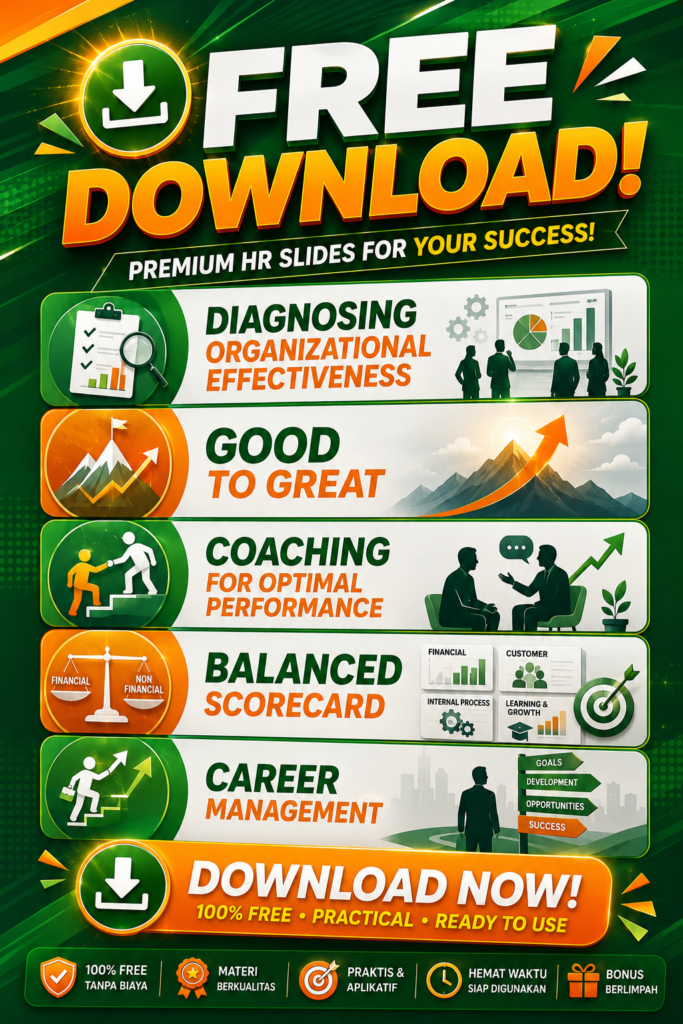
FREE Excellent HR Powerpoint Slides for YOU and your team.

These brilliant HR PPT Slides are the perfect solution for HR Managers who want to save time, increase their knowledge and skills, and develop their employees effectively.

These amazing HR Slides are designed to provide you with everything you need to create amazing HR presentations and develop your employees’ skills.

All slides are designed in powerpoint files (ppt) so that you can modify and immediately use for your own learning process.

There are 15 excellent HR presentation topics :

1. Competency-based HR Management
2. HR Scorecard
3. Principles of HR Management
4. Measuring ROI of Training
5. Change Management

6. Diagnosing Organizational Effectiveness
7. Good to Great
8. Coaching for Optimal Performance
9. Balanced Scorecard
10. Career Management

11. Communication Skills
12. Emotional Intelligence
13. Developing Leadership Skills
14. Presentation Skills for HR Managers

15. AI STRATEGY for HR Managers

You can download these amazing HR presentation slides for free. Please enter your email address to download these brilliant HR PPT Slides.

We will instantly send the powerpoint files to your email address. If you do not see the email in your inbox, please check your “promotion” folder.


Your subscription could not be saved. Please try again.


Your subscription has been successful.


The Role of AI in HR Management

The role of artificial intelligence (AI) in HR management is rapidly evolving, and it is changing the way organizations approach workforce management. AI has the potential to revolutionize HR management by providing valuable insights, automating tedious tasks, and improving the overall employee experience.

One of the most significant advantages of AI in HR management is its ability to analyze vast amounts of data quickly and accurately. By analyzing data from various sources, including performance reviews, employee surveys, and social media, AI can identify trends and patterns that might not be visible to humans.

For example, AI can analyze employee sentiment and identify areas where employees are dissatisfied with their work environment or workload. By identifying these issues, HR managers can take steps to address them and improve the overall employee experience.

AI can also help HR managers automate tedious tasks, such as scheduling interviews and responding to routine employee inquiries.

By automating these tasks, HR managers can free up time to focus on more strategic initiatives, such as employee engagement and retention. Additionally, AI-powered chatbots can provide employees with instant responses to their questions and concerns, improving their overall experience with the HR department.

Continue reading “The Role of AI in HR Management”

Types of HRIS Web-based Application

Human Resource Information System (HRIS) applications are software solutions designed to streamline and automate various HR functions, including recruitment, payroll, benefits administration, employee management, and performance management.

These applications are designed to enhance HR efficiency, save time, and reduce the risk of errors in HR processes. In this article, we will discuss the benefits and features of HRIS applications.

Benefits of HRIS Applications HRIS applications offer several benefits to organizations, including:

Time Savings: HRIS applications automate many HR processes, which reduces the time and effort required to complete HR tasks. This allows HR professionals to focus on more strategic initiatives and improve their productivity.

Continue reading “Types of HRIS Web-based Application”

My Training Skills as an HR Manager

As an HR manager, I was responsible for recruiting and training new employees, managing employee relations, and ensuring the company’s compliance with labor laws. But as the company grew, so did my responsibilities, and I realized that I needed to improve my training skills to keep up with the demands of the job.

My first step was to assess my current training skills and identify areas that needed improvement. I recognized that while I had experience in conducting training sessions, I lacked the skills to design effective training programs. I also needed to learn how to assess the effectiveness of the training and make adjustments as needed.

To address these gaps, I enrolled in a training course that covered instructional design, delivery methods, and evaluation techniques. The course was intensive, and I spent countless hours studying and practicing my new skills. But the effort was well worth it, as I gained a new level of confidence in my ability to create effective training programs.

Continue reading “My Training Skills as an HR Manager”

HR PPT Slides and HR Tools

In this page, you can view all of 15 excellent powerpoint slides on HR Management. All slides are designed in powerpoint files (ppt) so that you can modify and immediately use for your own learning process.

There are 15 excellent HR presentation topics :

1. Competency-based HR Management
2. HR Scorecard
3. Principles of HR Management
4. Measuring ROI of Training
5. Change Management

6. Diagnosing Organizational Effectiveness
7. Good to Great
8. Coaching for Optimal Performance
9. Balanced Scorecard
10. Career Management

11. Communication Skills
12. Emotional Intelligence
13. Developing Leadership Skills
14. Presentation Skills for HR Managers
15. Creative Thinking Skills for HR Managers

You can download all of these amazing slides HERE

We also proudly present ULTIMATE HR TOOLS for HR MANAGERS. In total, there are 14 exceptional HR tools that you can immediately use to enhance your HR performance.

1. A Complete Catalog of KPIs for All HR Functions.
2. A Set of Competency-based Interview Questions.
3. HR Audit Questionnaire.
4. Employee Satisfaction Survey Questionnaire.
5. Competency Development Template and Guidebook.

6. Powerful Template – Table of KPIs for HR Managers.
7. Tool to Evaluate HR Effectiveness.
8. Employee Development Plan Guidebook.
9. Sample of HR Strategic Plan and Program.
10. Tools and Templates for Implementing a Career Management System.

11. Tools and Templates for Implementing a Talent Management System.
12. HR Strategy Map Tools and Templates.
13. Tools and Templates for Measuring ROI of Training.
14. Tools and Templates for Conducting Workload Analysis.

You can DOWNLOAD all of these powerful HR Tools HERE