KPI Management Tool and Its Applicable Methods

Did you know kpi management tool can streamline performance tracking, ensuring that your HR department operates efficiently?

This essential tool allows businesses to monitor key performance indicators (KPIs) that align with their strategic goals, helping them stay ahead in the ever-evolving market.

Why You Need a KPI Management Tool?

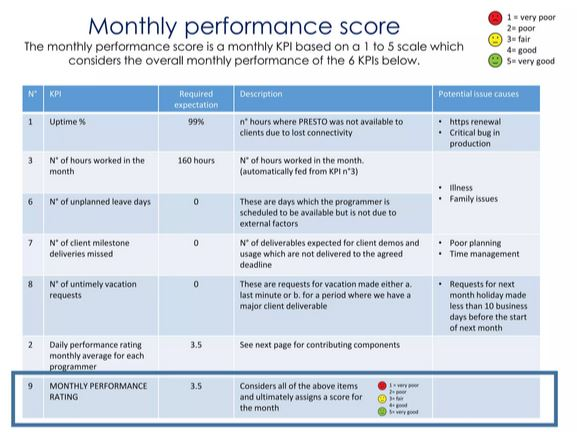
Understanding the need for a kpi management tool is crucial for effective HR planning. This template helps in setting clear expectations, measuring performance, and identifying areas for improvement.

By tracking specific metrics such as employee turnover, satisfaction, and training effectiveness, businesses can make informed decisions.

Additionally, it fosters accountability and enhances overall productivity, making it an indispensable tool for any organization aiming for success.

KPI Management Tool Manual Examples

Here are some human resources kpi templates commonly used in HR tools automation:

1. Employee Turnover Rate

  • Formula: (Number of separations during the period / Average number of employees during the period) x 100
  • Purpose: Helps in understanding the rate at which employees leave the organization.

2. Employee Satisfaction Index

  • Formula: (Sum of all satisfaction scores / Number of respondents)
  • Purpose: Measures how satisfied employees are with their roles, management, and workplace environment.

3. Training Completion Rate

  • Formula: (Number of employees who completed training / Total number of employees) x 100
  • Purpose: Tracks the percentage of employees who have completed required training programs.

4. Absenteeism Rate

  • Formula: (Total number of days absent / Total number of working days) x 100
  • Purpose: Monitors how often employees are absent from work.

5. Time to Fill

  • Formula: Total days to fill a position / Number of positions filled
  • Purpose: Measures the efficiency of the recruitment process.

KPIs Template Exemple (Table)

KPI CategoryKPIDefinitionTarget/GoalFrequency of MeasurementResponsible Person
RecruitmentTime to HireThe average number of days to fill a position30 days or lessMonthlyHR Manager
 Cost per HireThe total cost of hiring divided by the number of hires$3,000 per hireMonthlyHR Manager
 Offer Acceptance RatePercentage of job offers accepted by candidates90% acceptanceMonthlyRecruitment Lead
Employee EngagementEmployee Satisfaction ScoreAverage satisfaction score from employee surveys80% or higherQuarterlyHR Director
 Employee Retention RatePercentage of employees remaining with the company over a year85% retentionAnnuallyHR Director
Training & DevelopmentTraining Completion RatePercentage of employees who complete assigned training100% completionQuarterlyLearning & Development Head
 Internal Promotion RatePercentage of job positions filled by internal candidates30% internal promotionAnnuallyHR Manager
Performance ManagementEmployee ProductivityOutput or performance relative to job expectations90% or higherQuarterlyDepartment Heads
 360-Degree Feedback ScoreAverage feedback score received from peers, managers, etc.80% positive feedbackAnnuallyHR Manager
Payroll & BenefitsPayroll AccuracyPercentage of payroll processed without errors100% accuracyMonthlyPayroll Manager
 Benefits Enrollment ParticipationPercentage of employees who enroll in company benefits95% enrollmentAnnuallyBenefits Coordinator

How to Use a KPI Management Tool?

Implementing a human resource KPI template in your organization involves several steps to ensure its effectiveness:

Step 1: Identify Key Metrics

Start by identifying the KPIs that align with your company’s strategic objectives. Consider areas such as recruitment, retention, training, and employee satisfaction.

Step 2: Set Targets

For each KPI, set realistic and achievable targets. These should be based on historical data and industry benchmarks.

Step 3: Collect Data

Regularly collect data relevant to each KPI. This may involve using HR software, employee surveys, and other data collection tools.

Step 4: Analyze and Report

Analyze the collected data to identify trends and areas needing improvement. Generate reports to share insights with stakeholders and adjust strategies accordingly.

Step 5: Review and Adjust

Periodically review the KPIs and their targets. Make necessary adjustments to keep them relevant to the organization’s evolving needs.

Helpful tips: Managing Team Performance is Hard, Here’s the Solution

3 Benefits of Using a KPI Management Tool

These are several benefits you can gain by properly implementing and using a human resource KPI template in your business. Learn more about them below:

1. Improved Decision-Making

Using a human resource KPI template provides actionable insights, enabling better decision-making. By having access to accurate data, HR managers can make informed choices regarding recruitment, training, and employee engagement strategies.

2. Enhanced Accountability

Tracking KPIs fosters a culture of accountability. Employees and managers alike are aware of performance expectations and are motivated to achieve them, leading to improved overall performance.

3. Increased Efficiency

A KPI management tool streamlines processes by focusing efforts on critical areas that impact organizational success. This results in more efficient use of resources and time, ultimately enhancing productivity.

In conclusion, leveraging a kpi management tool can significantly improve HR management processes. To further enhance your HR strategies, explore our comprehensive resources on HR management and KPI templates.

What is All in One HR System? Here the 5 Major Components

We are agree that businesses need efficient solutions to manage their workforce. An all in one HR system is the answer, offering a comprehensive platform that integrates various HR functions into a single, streamlined software.

This system helps organizations handle everything from recruitment to analytics, making HR processes more efficient and effective.

Understanding What is All In One HR System

An all in one HR system is a unified platform designed to manage all aspects of human resource management. This software integrates multiple HR functions into one cohesive system, eliminating the need for separate tools.

From hiring and onboarding new employees to tracking performance and managing payroll, it provides a centralized solution that enhances productivity and reduces administrative burdens.

5 Major Components That Mostly Included in All in One HR Software System

An all in one HR software encompasses several key components, each addressing a crucial aspect of HR management. Let’s explore these components:

all in one hr system business

1. Recruitment and Onboarding

Recruitment and onboarding are fundamental to any HR system. This module helps streamline the hiring process, allowing HR teams to post job openings, track applications, and manage candidate interviews.

The onboarding feature ensures new employees are seamlessly integrated into the company, with access to necessary documents, training materials, and company policies, making their transition smooth and efficient.

By automating these processes, organizations can save time, reduce errors, and improve the overall candidate experience.

Learn more about recruitment tools human resource that we recommend for you to elevate your business.

2. Time and Attendance Tracking

Time and attendance tracking is essential for monitoring employee work hours and ensuring accurate payroll processing. This component automates the tracking of clock-ins, clock-outs, and breaks, providing detailed reports on employee attendance.

It helps HR managers enforce punctuality, manage leave requests, and comply with labor regulations, all while reducing errors and saving time. Additionally, this module often integrates with payroll systems to ensure employees are compensated accurately based on their logged hours.

3. Performance Management

Performance management within an all in one HR system focuses on evaluating and enhancing employee performance. It includes tools for setting goals, conducting performance appraisals, and providing feedback.

This module encourages continuous improvement, aligns individual objectives with organizational goals, and identifies top performers for rewards and recognition. By fostering a culture of feedback and development, companies can boost employee engagement and drive better business outcomes.

Facing issues in performance management? Learn how to solve it using our method.

4. HR Database

An HR database serves as the central repository for all employee information. It securely stores data such as personal details, employment history, benefits, and compliance records.

This centralized access simplifies data management, ensures accuracy, and supports HR teams in making informed decisions based on comprehensive employee records.

With all data in one place, HR professionals can quickly retrieve information, generate reports, and ensure compliance with legal requirements.

5. HR Analytics

HR analytics leverages data to provide insights into workforce trends and HR processes. This component generates reports and dashboards that help HR professionals analyze metrics such as turnover rates, employee satisfaction, and productivity.

By utilizing these insights, organizations can make data-driven decisions to optimize their HR strategies and improve overall business performance. HR analytics also helps in identifying potential issues early, allowing proactive measures to be taken to address them.

What are the Benefits of Using HR All in One HR System?

Implementing an all in one HR system offers numerous benefits. It enhances efficiency by consolidating various HR functions into a single platform, reducing the need for multiple tools and manual processes.

This integration leads to better data accuracy, improved compliance, and increased productivity.

Additionally, it supports better decision-making through robust analytics, provides a seamless employee experience, and saves time and resources by automating routine tasks.

Moreover, an all in one HR system improves communication within the organization by providing a centralized platform for information sharing.

Employees can access their records, request leaves, and receive updates, all through a single interface. This transparency fosters trust and engagement, leading to a more motivated workforce.

In case you need a recommendation for this software, you might be interested in trying Peopleforce.io, Omnihr.co, and others. There are many options to consider; for a corporate starter, you may want to run a free demo to make the best decision.

For businesses looking to revolutionize their HR management, exploring comprehensive resources is essential. Visit hr-management-slides.com to access valuable materials that can guide you in creating a tailored All in One HR system for your organization.

HR Administrator Job Description Template with Tables

Are you looking to hire an HR Administrator? This HR Administrator job description template will help you outline the key roles, responsibilities, and qualifications for the position.

Whether your organization is small or large, defining these criteria clearly ensures you attract the right candidates to your team.

What is an HR Administrator?

An HR Administrator is a professional who provides administrative support to the human resources department. They play a vital role in managing employee-related documentation, overseeing recruitment processes, and ensuring the smooth operation of HR policies.

hr administrator job description template exemples

In this position, you’ll handle sensitive information, requiring confidentiality and excellent organizational skills. The role bridges the gap between employees and HR managers by ensuring day-to-day administrative tasks are completed effectively.

Job responsibilities can vary depending on the organization, but an HR Administrator generally assists in creating a positive work environment while ensuring compliance with labor laws and company policies.

Their expertise contributes to workforce satisfaction and efficient company operations.

HR Administrator Responsibilities

  • Maintain accurate and updated employee records.
  • Assist in recruitment processes, including job postings and scheduling interviews.
  • Handle onboarding and offboarding processes for employees.
  • Prepare HR-related documentation such as contracts, policies, and letters.
  • Coordinate employee training and development programs.
  • Manage employee benefit programs and assist with payroll queries.
  • Act as a point of contact for employee inquiries regarding HR policies.
  • Ensure compliance with labor laws and company policies.
  • Organize and maintain the HR department’s filing system.
  • Support performance management procedures.

Requirements and Skills

  • Proven experience as an HR Administrator or in a similar role.
  • Knowledge of HR software systems and databases (e.g., HRIS).
  • Familiarity with labor laws and regulations.
  • Excellent organizational and multitasking abilities.
  • Strong communication and interpersonal skills.
  • Proficiency in MS Office (Word, Excel, and PowerPoint).
  • High level of confidentiality and discretion.
  • Bachelor’s degree in Human Resources, Business Administration, or a related field.

Looking for detailed requirements hr administrator job description template and its essential and desireable skills? Here’s the simple version:

JOB DESCRIPTION: HR ADMINISTRATOR
PREFERRED EXPERIENCE
SpecificationEssential/Desirable
Education, Qualifications and Training
Bachelor’s degreeD
Qualification (or currently pursuing) in Human ResourcesD
Experience
Background in an administrative support role, delivering high-quality and timely workE
Background in an administrative support role within a Human Resource departmentD
Background in an administrative support role within Higher EducationD
Knowledge, Skills and Abilities
Effective written and verbal communication skills, with strong interpersonal abilities to engage with individuals at various levels, including sensitive mattersE
Proficient in IT skills, including Excel, Mail Merge, and generating reportsE
Highly organized, capable of prioritizing tasks and meeting deadlinesE
Keen awareness of detailsE
Collaborative team member with the capacity to work independentlyE

Examples of HR Administrator Jobs

If you want to gain a deeper understanding of what the role of an HR administrator job description template entails within a company, the easiest way to do so is by looking at real-life examples.

Below, we provide several examples of the responsibilities of an HR administrator across various business sectors, ranging from IT companies to startups.

IT Company

An HR Administrator in an IT company often works closely with technical managers to streamline the hiring of developers, designers, and IT support staff.

Their role involves creating job descriptions tailored to specific technical skills, conducting initial screenings, and assisting in organizing coding assessments. Additionally, they may oversee employee well-being programs like mental health workshops or tech skill-building sessions.

Read another: How to Train Employee with AI Technologies and Preparing Them

Retail Chain

In retail, HR Administrators manage large teams of frontline staff. Their duties often include scheduling shifts, tracking employee attendance, and coordinating payroll adjustments for overtime. They might also handle seasonal hiring and ensure staff training aligns with customer service standards.

Startup

In startups, the HR Administrator’s role is multifaceted. They might take on tasks ranging from onboarding new hires to planning company culture initiatives like team-building events. Given the dynamic nature of startups, they often work closely with founders to align best HR practices with the company’s growth goals.

This HR Administrator job description template provides a comprehensive guide to outline expectations for the role. Tailor it to your organization’s specific needs to attract qualified and capable candidates.

Need a KPI or another helpful template in human resource management? Kindly download our free template.

5 Best HR Practices PPT Ideas (With Proof and Data)

There are several best HR practices PPT ideas that you can implement to enhance the quality of human resource management within your company.

These range from the use of AI, which has become a hot topic worldwide, to the implementation of 360-degree feedback. However, to truly benefit from these practices, it is essential to ground them in research and proven methodologies.

These Are the 5 Best HR Practices Suitable for PPT Materials

Theory alone is not sufficient. Therefore, we will also include some research data regarding each best HR practices PPT ideas. Below is a more detailed explanation

Competency Based HR Premium Template

1. AI and Automation in HR Operations

Leveraging AI and automation in HR operations can significantly enhance efficiency and streamline processes. By automating repetitive tasks such as resume screening and interview scheduling, HR professionals can focus on more strategic initiatives that require human insight.

Efficiency Gains: Automates administrative duties, freeing up time for strategic work.

Enhanced Recruitment: Analyzes applications quickly, reducing time-to-hire and promoting diversity. Learn more about it here recruit employee with AI.

Data-Driven Decisions: Provides valuable analytics for informed talent management.

For instance, a report from McKinsey indicates that organizations using AI in their HR processes can reduce hiring time by up to 50%. As a result, this leads to faster onboarding and improved candidate experiences.

2. Continuous Learning and Development

Continuous learning and development initiatives are crucial for employee growth and organizational success.

By fostering a culture of learning, organizations not only enhance employee skills but also improve job satisfaction and retention rates. You definitely want to add this topic to the best HR practices PPT:

Skill Enhancement: Keeps employees updated with industry trends.

Employee Engagement: Shows investment in employee growth, leading to higher satisfaction.

Organizational Benefits: Fosters innovation and adaptability to align capabilities with business goals.

Furthermore, companies that offer comprehensive training programs have 218% higher income per employee than those without formalized training. In addition, 94% of employees stated they would stay longer at a company that invests in their learning and development.

3. Providing 360 Feedback

Implementing a 360-degree feedback system offers a holistic view of employee performance by incorporating input from various sources.

Consequently, this approach enhances self-awareness among employees and informs their development plans.

Holistic Performance Assessment: Gathers feedback from supervisors, peers, subordinates, and clients.

Increased Self-Awareness: Helps employees understand how their behavior is perceived by others.

Development Planning: Guides targeted training opportunities based on feedback insights.

According to the Center for Creative Leadership, 86% of organizations use 360-degree feedback for leadership development.

Moreover, 89% report that it helps employees understand their strengths and weaknesses better. Additionally, the global market for 360-degree feedback software was valued at $943 million in 2023, indicating its growing adoption among companies.

4. Building Transparency

Building transparency within an organization fosters an open communication culture that enhances trust and accountability. When employees are informed about company decisions, they are more likely to engage positively with their work environment.

Open Communication Culture: Encourages trust through informed decision-making.

Encouraging Feedback: Promotes sharing of ideas and concerns without fear of reprisal.

Accountability: Enhances organizational integrity by holding everyone accountable.

Moreover, organizations with high transparency levels experience a 30% increase in employee satisfaction, according to studies conducted by the Society for Human Resource Management (SHRM). Similarly, transparent communication has been linked to improved team collaboration and performance.

5. Prioritizing Workplace Safety

Prioritizing workplace safety is essential for protecting employees and enhancing productivity. Recent statistics highlight the importance of this practice:

In the first half of 2024, there were 19 workplace fatal injuries, translating to an annualized rate of 1.0 fatalities per 100,000 workers.

Approximately 293 workers sustained major injuries, with an annualized rate of 16.0 injuries per 100,000 workers during the same period.

In the UK, there were 138 work-related fatalities reported in 2023/24, alongside 604,000 non-fatal injuries, emphasizing the need for robust safety measures.

Therefore, organizations should conduct risk assessments, provide regular training, and establish clear health and safety policies to create a secure work environment.

  • Risk Assessments: Identifies potential hazards to prevent accidents.
  • Regular Training: Ensures employees are informed about safety protocols.
  • Health and Safety Policies: Protects employees while fostering a culture of safety.

These are some best HR practices PPT materials that you can try and implement directly to enhance the quality of human resource development. Interested in other topics? Get comprehensive ideas on HR training at hr-management-slides.com today.

5 Essential Components of an HR Monthly Report Template

Creating an HR monthly report template is a key tool for tracking a company’s workforce health, employee engagement, and compliance with policies.

Such a report consolidates data, insights, and key HR metrics into one document, providing management with a clear, actionable overview.

With a structured report template, HR teams can consistently monitor critical factors like recruitment, retention, training, and policy compliance.

This monthly summary is invaluable for assessing workforce trends, identifying improvement areas, and supporting strategic planning. Here’s an in-depth look at five core components that every effective HR monthly report should include.

5 Major Components of an HR Monthly Report, Brief Checklist

An effective HR monthly report template is comprehensive and provides insights into various workforce conditions.

hr monthly report template exemple

Below are the essential components every HR team should cover to ensure a balanced view of employee metrics, recruitment, training, engagement, and compliance.

1. Employee Metrics

Headcount  : Headcount offers a clear view of the total workforce, tracking the number of employees, recent hires, and separations within the reporting period. This metric highlights growth, stability, or reductions in the company’s workforce.

Turnover Rate  : The turnover rate is the percentage of employees who leave the organization, divided into voluntary and involuntary separations. Monitoring turnover helps assess workforce stability and identify departments that may require retention strategies.

Retention Rate  : This metric indicates the percentage of employees who stay with the company over a defined period. A high retention rate often reflects strong employee satisfaction and a supportive work environment, crucial for long-term business success.

2. Recruitment and Staffing

Open Positions  : Tracking open positions helps gauge hiring demands and evaluate the efficiency of recruitment efforts. It provides insight into which roles are consistently in demand and identifies gaps within teams.

Time to Fill  : Time to fill refers to the average duration taken to recruit for open positions. This metric helps HR assess the speed and efficiency of hiring processes, with shorter times often indicating effective recruiting methods.

Sources of Hire  : Analyzing sources of hire reveals the most successful channels, whether job boards, referrals, or social media. This insight can optimize recruitment budgets by focusing on channels that yield the best hires.

Learn more about how this process works on HR recruitment strategy.

3. Training and Development

Training Hours : The total training hours show the company’s commitment to employee growth and skill development. Higher training hours reflect investment in workforce capability, fostering productivity and adaptability.

Participation Rates  : Participation rates in training programs show employee engagement with development opportunities. Tracking this rate helps HR teams understand which programs are effective and where improvements may be needed.

Skill Development Metrics  : Skill development metrics measure the impact of training, highlighting skills acquired or improved. This data ensures training programs align with organizational goals and meet employee development needs.

 4. Employee Engagement and Satisfaction

Survey Results  :Survey results summarize feedback on engagement or satisfaction, giving a snapshot of employee sentiment. These insights help HR address areas needing improvement in work culture and team morale.

Participation Rates  : Participation rates in engagement initiatives indicate employees’ interest in workplace activities, showing their level of involvement in the company’s cultural and social programs.

Feedback Trends : Analyzing feedback trends helps HR understand patterns in employee sentiment, offering actionable insights for policy improvements and a positive workplace culture.

Read more: 3 HR Survey Tools for Employees, Our Best Recommendation

 5. Compliance and Policies

Policy Updates: Regular policy updates keep the workforce informed of any changes in HR policies or procedures. This ensures that employees remain aligned with company standards and legal requirements.

Compliance Issues: A summary of compliance-related incidents or concerns is essential to avoid legal risks and maintain ethical standards. Tracking these issues also supports transparent reporting and continuous improvement in compliance practices.

Benefits of Creating HR Monthly Reports

Why bother creating HR monthly report template? Good questions, here are several benefits you can get:

Data Insights: Provides critical data for informed decisions and trend analysis.

Accountability: Holds HR accountable for meeting goals and aligning with organizational objectives

Transparency: Keeps stakeholders informed and encourages feedback for improvements

Understanding Sentiment: Identifies areas for improvement in employee satisfaction and retention

Tracking Compliance: Assists in monitoring adherence to labor laws and identifying potential risks

So, how far along is your report creation progress? To make things simpler, you might just download HR monthly report template. Download the materials from our website and customize your own.

3 HR Screening Tools and Manual Methods, Which One Is Better?

HR screening tools is an essential first step in the hiring process. Through screening, companies filter job applicants, identifying those most aligned with the requirements of a role before investing in further assessment.

This crucial phase not only saves time and resources but also elevates the quality of hires by ensuring a good fit between candidates and the organization.

By combining advanced tools and strategic methods, HR teams can optimize their screening processes for efficiency and accuracy. Let’s dive deeper into what HR screening entails, its benefits, and the top tools that can enhance this process.

What is HR Screening?

HR screening refers to the process of reviewing job applicants to determine if they meet the necessary qualifications for a specific position.

Screening generally involves assessing resumes, analyzing skillsets, and confirming basic eligibility factors like education and experience.

This process aims to narrow down a large pool of applicants to a shortlist of qualified candidates, streamlining the hiring process and ensuring that only top talent moves forward.

Benefits of HR Screening

Here’s a breakdown of the core benefits:

  • Time and Resource Efficiency: By filtering out unqualified applicants early, HR screening saves substantial time and effort, especially valuable in high-volume hiring environments.
  • Improved Hire Quality: Effective screening ensures that only the most qualified candidates move forward, leading to better job performance, higher retention, and greater satisfaction among employees.
  • Fairness and Objectivity: Structured screening reduces biases, focusing on candidates’ qualifications objectively and promoting a fair hiring process that encourages diversity and inclusion.
  • Enhanced Workforce Alignment: Screening enables organizations to evaluate candidates’ alignment with company culture and long-term goals, building a workforce that’s cohesive and driven.
  • Reduced Turnover Rates: By selecting candidates with the right skills and fit for the role, screening helps lower turnover, saving costs associated with rehiring and retraining.
  • Data-Driven Decisions: Advanced screening tools provide insights and analytics, allowing HR teams to make informed hiring decisions based on data rather than guesswork.

3  Best HR Screening Tools

There are many HR screening tools available, and for a new business, it can be challenging to decide which one to try. We’ve selected a few personal recommendations for HR screening tools that blend automation with integrated systems. Request a demo to learn more

 1. CiiVSOFT

CiiVSOFT is a powerful job application screening tool that uses automation to streamline hr resume screening software. It reviews and evaluates resumes and job applications in seconds, significantly reducing the time and effort hiring managers spend on initial screening. This software’s intelligent features quickly identify the most qualified candidates, ensuring a better alignment between job requirements and applicants’ skills.

 2. Workable

Workable is a popular applicant tracking system known for its robust screening capabilities. It enables HR professionals to create customized screening questions and evaluate candidates based on their answers.

With its automation features, hr resume screening software by Workable can automatically filter candidates who meet specific qualifications, further expediting the hiring process. In addition to screening tools, Workable integrates with various job boards and background check providers, offering a complete solution to manage all aspects of recruitment.

 3. Greenhouse

Greenhouse is another widely-used applicant tracking system with advanced screening features. It allows hiring teams to create tailored screening questionnaires and assess candidates according to their responses.

Greenhouse also integrates with third-party assessment tools, which allows companies to conduct further evaluations if needed. Its comprehensive features make it ideal for companies looking to streamline the hiring process with flexible screening options.

Baca juga: Best HR Digital Tools and Why Your Business Needs Them

Manual Screening Method, Is it Obsolete or Simply Better?

Although automated tools are invaluable for efficient HR screening, manual screening can still play a crucial role, particularly for roles requiring specific expertise or for companies seeking a more personal touch in their hiring process. Here are some tips for making manual screening efficient:

1. Define Clear Criteria

Before reviewing applications, list essential qualifications and desired traits specific to the role. This will help you assess resumes quickly and consistently.

2. Organize a Screening Checklist

Create a checklist of key competencies, experience, and skills, allowing you to standardize the review process across applicants. This step ensures that each candidate is assessed fairly.

3. Segment Candidates by Priority

Divide applicants into groups based on how well they align with job requirements. Prioritizing candidates can streamline the interview selection process, enabling you to focus first on the strongest contenders.

4. Limit the Number of Reviews

To avoid decision fatigue, limit the number of resumes reviewed in a single session. A fresh perspective will help you assess each candidate more accurately.

5. Involve Team Members

Involving team members in the screening process can provide a broader perspective, helping avoid biases and improve candidate selection.

Through these methods, manual screening can remain a viable, effective option when executed with clarity and consistency, ensuring that the screening process is thorough yet manageable.

That’s all we have to share about HR screening tools and resume software. We hope this helps! If you need PPT slides on recruitment management or something similar, feel free to download them from our website, hr-management-slides.com.

There you’ll find plenty of useful materials to enhance your HR business management.

HR Review Meeting PPT, 5 Key Templates and Starting Points

Human Resources (HR) is essential in fostering a productive workplace and aligning employee performance with organizational goals. Structured HR review meeting PPT offer a platform for HR professionals and organizational leaders to assess performance metrics, gather employee feedback, plan strategically, and ensure regulatory compliance.

Using well-designed templates for these meetings enhances efficiency by providing clear, actionable insights. Below, we dive into key content areas and templates ideal for an HR Review Meeting PowerPoint presentation.

5 Template Exemple for HR Review Meeting PPT

These five materials can be used as templates for meetings with teams in the office. Feel free to customize them as needed:

 1. Performance Metrics Templates

Tracking performance metrics is essential for evaluating the effectiveness of HR practices and their impact on organizational success.

Metrics such as turnover rates, employee satisfaction scores, and recruitment efficiency serve as critical indicators of the health of the organization.

Regularly reviewing these metrics should be a key item on the HR staff meeting agenda, allowing HR professionals to identify trends, diagnose issues, and implement strategies for improvement.

Template Examples 

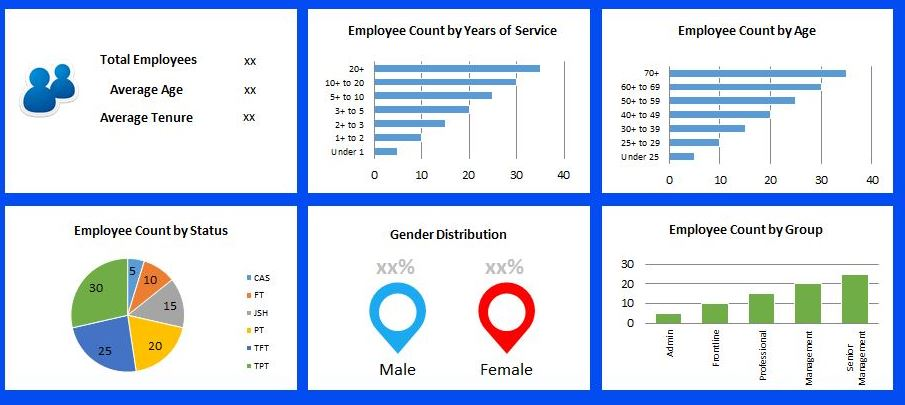
1. KPI Dashboard Template: This template visually represents key performance indicators (KPIs) over time, including turnover rates and employee satisfaction scores. Interactive dashboards can be created using Microsoft Excel or Google Sheets, making it easy to update data and display trends in real time.

2. Employee Turnover Rate Template: This template outlines turnover rates segmented by department or job role, allowing HR to focus on areas needing attention. Including comparisons with industry benchmarks provides valuable context.

3. Recruitment Efficiency Metrics Template: Displaying metrics such as time-to-fill positions and cost-per-hire, this template utilizes bar graphs or pie charts for a quick visual overview of recruitment efficiency.

Employee Feedback Templates

Employee feedback offers vital insights into employee experiences and the organizational culture.

By gathering feedback, HR review meeting PPT can identify strengths and areas needing improvement, enabling them to shape strategies that better meet employee needs.

Template Examples 

HR review meeting PPT survey employee

1. Employee Survey Template: A comprehensive survey covering job satisfaction, workplace environment, and areas for improvement. Platforms like SurveyMonkey or Google Forms can help design this, with responses visually represented in the PPT through graphs or charts.

2. Feedback Form Template: A simplified feedback form distributed post-meeting or during annual reviews. This form can include open-ended questions, capturing qualitative insights that can be summarized to provide a narrative on employee sentiment.

3. Focus Group Report Template: This template summarizes employee focus group discussions. Including themes and direct quotes personalizes feedback, making it more impactful in the meeting context.

Read more: Employee Performance Improvement Plan Template

Strategic Planning Templates

Strategic planning in HR aligns Human Resource initiatives with broader organizational goals. This involves setting objectives, developing action plans, and establishing timelines to ensure HR effectively contributes to the organization’s mission.

Template Examples 

1. Strategic Initiative Outline Template: This template details HR initiatives aligned with organizational goals, specifying objectives, responsible parties, resources, and expected outcomes. A Gantt chart format can visually represent timelines and milestones.

2. Action Plan Template: Outlining specific actions to achieve HR goals, this template includes deadlines and accountability, helping teams track progress and stay on schedule.

3. SWOT Analysis Template: A SWOT analysis (Strengths, Weaknesses, Opportunities, Threats) offers a comprehensive view of the HR strategic landscape. It facilitates discussions on leveraging strengths and addressing weaknesses in HR practices.

Compliance Review Templates

Compliance in HR practices is vital to reduce risks and maintain adherence to legal standards. Regular compliance reviews help organizations avoid penalties and improve their reputation.

Template Examples 

1. Compliance Audit Checklist Template: This checklist covers compliance audit areas such as employee classification, wage laws, and workplace safety. It serves as a practical guide during internal HR audits.

2. Policy Review Template: Organize HR policies with a template including descriptions, review dates, and compliance status. This ensures policies remain current and legally compliant.

3. Regulatory Requirements Summary Template: A summary template outlines key labor laws and regulations. Including action items for HR keeps compliance front and center during meetings.

Incorporating these templates into HR review meetings can enhance the clarity and effectiveness of discussions.

By systematically covering performance metrics, employee feedback, strategic planning, and compliance, HR professionals promote a culture of continuous improvement and drive organizational success.

Creating these from scratch can be a hassle. That’s why you might be interested in downloading a HR review meeting PPT ready to use template to simplify the process. You can also get our free template available at hr-management-slides.com, Enjoy the meeting, folks!

DOWNLOAD for FREE NOW - These Amazing HR Slides and Templates !!